The FAQ has been recently updated.
In many cases, answers can be found more quickly here than by sending an email, so it is advisable to read through these entries comprehensively before contacting support.

The FAQ has been recently updated.
In many cases, answers can be found more quickly here than by sending an email, so it is advisable to read through these entries comprehensively before contacting support.
Marshland Lite is the first library that downloads via Continuata’s new download system which you can read about at Continuata.io. Other libraries are being migrated over to the new system currently.
Continuata.io‘s new download system offers in-browser downloads (without external software) for Chrome and Edge users. It is advisable to select a fast drive to download to, like an SSD (or an internal drive if it’s an SSD). Chrome and Edge users who are not downloading to a fast drive may encounter slow speeds. In this case, you should download the Continuata Bridge app to run alongside. It’s a sidecar app, so you just need to run it and have it remain open while you are downloading from the browser. This should help speed up the download. Please keep in mind that with this new system, the library actually installs while it downloads, so you shouldn’t have to wait for it to install when it’s done downloading. This is particularly notable on large products.
If you are trying to use a browser which is not Chrome or Edge (like Firefox or Safari), it is a requirement to run the Continuata Bridge app during the download. You still download from within the browser, however.
When you are selecting a folder path to download to (in the browser), it may disallow it because that path contains “system files.” In this case, simply create a folder within that folder and direct the download there. If you encounter issues during your download, try hitting ‘reset download progress’ at the bottom of the browser window. The downloader may use some extra CPU (partly because it’s decompressing files as it downloads), although the Bridge may help with this (i.e. running it even if you are on Chrome or Edge). Please note that traditional manual links are not available in this new system.
Additional tips:
Note: PS products are slowly being migrated to the new Continuata.io system from the old one as of now, so if you hit “View all my purchases” on the new Continuata.io system, the listings may be limited (at this point in time).
Nope. Please do not send any variation of this request under any circumstance!
The system is set up to automatically send out transactional emails almost instantly. Ideally you should receive them within a few minutes after your purchase. This is standard behavior. But sometimes things will deviate.
If you got charged and you don’t receive any transactional emails at all (invoice, order confirmation, etc), it may indicate that the order did not complete properly. In many of these cases the authorization charge reverses within a few days. However, email delivery failures can also occur independently of the transaction status, so in these specific cases checking directly with FastSpring is the most reliable way to confirm the state of your order. As FastSpring handles payments and transactions, please get in touch with them at this link for clarification. Performance Samples LLC is not able to directly aid in these circumstances as FastSpring handles the transactional process and payment issues like this.
If you got charged and you do receive your transactional emails (invoice, order confirmation, etc) but you don’t receive your product fulfillment email(s) (the Continuata email with your download code and instructions), it is usually a delivery issue. This can occur if certain mail providers reject or block messages (server rejection, bouncing, filtering, etc). In other cases, the emails get caught in a spam/junk folder. Because Continuata sends from a separate domain, some mail providers filter these emails more differently, which is why they may fail to arrive even when transactional emails come through without issue. If your spam/junk folders don’t bring up anything (check your webmail too, if possible), please send an email over to Performance Samples support (not FastSpring). Please keep in mind that FastSpring does not handle the product fulfillment side directly (the Continuata email with your download code and instructions). If you don’t receive your product fulfillment links, FastSpring won’t be able to help you as they handle the transactional/payment side only.
It is possible for messages to fail to reach either side due to mail-provider filtering, blocking, full mailboxes, or other server-level issues. This can affect both emails sent to Performance Samples LLC and replies issued from Performance Samples LLC. In some cases, messages may be rejected or blocked before they reach an inbox. If a support request regarding a purchase or fulfillment matter does not receive a reply, the mail provider involved may be preventing delivery. Checking spam/junk folders is recommended (including on webmail), and contacting Performance Samples LLC from an alternative email address may resolve the issue. While uncommon, if an order is confirmed and normal email delivery is not possible, Performance Samples LLC may, at its discretion, attempt to reach the customer using the phone number associated with the order.
This happens on occasion. It can be caused by a number of reasons. The most common reason is simply that the automated system has picked up on multiple purchase attempts (perhaps with payment methods that did not go through) and has blocked the email/IP temporarily.
For the quickest response, please contact FastSpring directly with the name of the product you’re trying to purchase, the attempted payment method, your name, your email, and any other details of your purchase issue. As mentioned above, sometimes multiple order attempts will cause the system to temporarily block an email and it will need to be reset by FastSpring. This isn’t a big deal but unfortunately has to be done manually.
If you are having trouble purchasing and a sale is ending soon, don’t worry — after doing the above, send an email over to support.
[RECENTLY UPDATED – DECEMBER 2025] If you are having trouble with the Continuata download app (Conduct), try “resetting” the download in the Conduct app by clicking the three little dots on the right of the window and selecting “Reset.” When it asks you if you want to “Leave” or “Remove” the downloaded archives, set it to “Remove.” Ensure the download is removed in your folders. If that doesn’t work, click the three little dots again and select “Delete.” Once again, set this to “Remove” in the window that comes up. Make sure the product is no longer in your Conduct window. Restart Conduct and then add the code again.
Another thing you can try (added November 2024 – and still seems to help as of December 2025) is if there is simply no movement or activity in the download (esp. if you have just added your code in), and it’s not doing anything, pause the download at the bottom of the Conduct window. Then navigate to the three little dots on the product and select “move” and select a new folder. Then reset the download per the instructions in the prior paragraph. Then start the download. This can help solve the issue in many cases.
Yet another thing to keep in mind (added October 2025): it appears that sometimes Conduct will crash if you minimize it during a download. So try keeping it open during the download, if you are having trouble with crashing.
Alternatively, you can generate manual download links by clicking here and pasting in the download code that you received in your Continuata download code email. If you have tried this and you are still unable to download, please send an email over to support.
[This answer contains details also noted in another entry]
In short, yes. It is possible for messages to fail to reach either side due to mail-provider filtering, blocking, full mailboxes, or other server-level issues. This can affect both emails sent to Performance Samples LLC and replies issued from Performance Samples LLC. In some cases, messages may be rejected or blocked before they reach an inbox. If a support request regarding a purchase or fulfillment matter does not receive a reply, the mail provider involved may be preventing delivery. Checking spam/junk folders is recommended (including on webmail), and contacting Performance Samples LLC from an alternative email address may resolve the issue. While uncommon, if an order is confirmed and normal email delivery is not possible, Performance Samples LLC may, at its discretion, attempt to reach the customer using the phone number associated with the order.
Not a problem – please send an email to Performance Samples support. Accidental re-purchases are something that can be handled by Performance Samples LLC, not FastSpring support.
If a review of applicable product-based loyalty code guides and the FAQ does not answer your question, please reach out to Performance Samples support: support (at) performancesamples.com
FastSpring handles all transaction and tax-related matters and may add taxes based on your territory/location and other factors. There may also be currency conversion factors. Performance Samples LLC is a US-based company and does not display prices inclusive of any additional tax which may or may not be applicable depending on territory/location and other factors. For a direct response, please contact FastSpring directly with details of your question or situation and they will be to help answer or track down the issue. For tax/VAT/GST inquiries, you can go directly to this page.
Performance Samples LLC doesn’t handle transactions directly (these are handled by FastSpring). For a direct response, please contact FastSpring directly with details of your question or situation and they will be to help answer or track down the issue. For specifically tax/VAT/GST inquiries, you can go directly to this page.
As FastSpring handles payments/transactions, please get in touch with them directly at this link for anything related to tax exemptions.
No. The EULA grants “the limited, personal, non-exclusive, non-transferrable… right to use the Samples” and specifies that “this license is only for you, the original user or purchaser.” In practical terms, a single license may only be used by one individual and cannot be shared among multiple people at a company.
If a purchase is being made on behalf of a company, each individual user at that company must have a separate license and a separate purchase. Because the EULA restricts the license to the “original user or purchaser,” the personal name of the end user must be listed on each purchase. A company name may be included in the “company” field at checkout, but it does not replace the requirement that the license be tied to an individual user.
Per the related FAQ question, each individual who is using a product at a company will need their own license attached to their name. When checking out, do not put the company name in as the first and last name. That should be for the individual user who will be using the product. There is a separate space to put the company name along with billing.
Please meticulously review the Loyalty tab on the product page. If you have fully exhausted that process and still have questions, feel free to reach out to support (at) performancesamples.com.
For customers who are paying with PayPal, this can be understandably confusing because of the way it’s setup. The field for the discount code (and/or VAT ID) appears on the order confirmation page once you have been transferred from PayPal back to FastSpring. So you will be transfered to Paypal, and then you will actually be transferred BACK to FastSpring to confirm.
It can be understandably unnerving, because it looks like you are “confirming” a purchase when you are in PayPal (the full amount, before any coupon discounts [when applicable]), but until you hit the checkboxes and finalize the order back on the FastSpring page, it’s not actually confirming the purchase.
Not yet, but this is being looked into.
There is no user login system in place. However, if you need to re-download your product, first check the links/code from Continuata. If it has expired, feel free to send an email over to support (at) performancesamples.com and I will get you a new download code/email message.
You should get an email which will have a code at the top. There are more detailed instructions in this email on how to download, but in summary you will put this code into the Continuata Connect download manager, and it will download the library for you and merge/build the library folder from the RAR files.
If you don’t want to go through the process of using the Continuata download software, you can simply request HTTP links by following the instructions in the email. However those can be a little less intuitive to decompress (as the Continuata software handles all that when you are doing that approach).
You’ll need to decompress the RAR files and build the folder hierarchy manually. This is something that the Continuata Connect app does automatically, but if you are downloading the HTTP manual links, you will need to do it yourself or at least guide the process.
A good file decompressor for Mac can be found here.
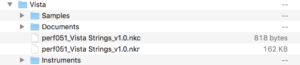
Decompress all the RAR files to a folder. Inside this folder you should have a Samples folder, an Instruments folder, a Documents folder, and a nkr file. The image below demonstrates what it would look like for “Vista” library. On some occasions you may have a Samples 2 folder, and Samples 3 folder, and so on. Some RAR expanders seem to interpret the files as separate rather than one package. If this is the case, merge the multiple “Samples” folders contents into one Samples folder. Here’s a short explanation of how to merge files on Mac.
If you are an existing owner of a library and an update is released, you don’t have to do anything – the system will send out a Continuata download code email when the update is officially released.
If you are trying to see if the library you have has had any updates on it, go to the product page and see if there’s a changelog page. Here’s an example.
No, this is against the EULA.
No, all of Performance Samples LLC’s products as of now require the full, retail version of Kontakt. This is made overtly clear in the product descriptions/specs and during the checkout process.
Kontakt Player (not Kontakt full) will only allow you to play the patches in DEMO mode for a limited time. Unless you are completely OK with that and understand what you’re getting into, please don’t go through the checkout process if you don’t own the full version of Kontakt.
As of now, there are no plans to do libraries for Kontakt Player. Please see product pages for the minimum version required.
Performance Samples LLC’s libraries don’t require serial numbers as they aren’t built for Kontakt Player. They require the full version of Kontakt. You’ll receive a code with download instructions for Continuata’s download system, and then once the library is downloaded, you can simply open the patches and play. Performance Samples libraries cannot be accessed via the Libraries section, as they are not Kontakt Player libraries. They can however be accessed via the Files tab or Quick-Load within Kontakt. See this article for more information.
This is likely because you are running the patches in Kontakt Player, even though you have the full version on your system. Load them into the full version of Kontakt and you should not see “DEMO mode.”
Doing this requires the library in question to be a Kontakt Player library. Performance Samples LLC’s libraries are not for Kontakt Player – they require the full, retail version of Kontakt. Libraries can be accessed via the Files tab or Quick-Load within Kontakt.
Try a batch resave, even if the library is already finding the proper samples. Sometimes this speeds things up.
Another thing you can try is (if on Windows), create an exclusion in your antivirus (or similar) software for the library folder.
First try a batch re-save (you can find a guide here). If that doesn’t work, you may want to re-download the library to ensure everything decompressed properly. Finally, if that doesn’t work, you may want to look into your hard drive formatting and whether it is formatted CAPS sensitive. If a library is formatted in this way, the drive can have trouble finding the files sometimes.
That code is just for the Continuata (Conduct) downloader. The libraries themselves don’t require any code or serial number to load/run, as they are for the full version of Kontakt (not Kontakt Player). Performance Samples LLC’s libraries can be accessed via the Files tab or Quick-Load within Kontakt (full).
Performance Samples libraries cannot be accessed via the Libraries section, as they are not Kontakt Player libraries. They can however be accessed via the Files tab or Quick-Load within Kontakt. See this article for more information.
The EULA does not limit the number of machines you can use Performance Samples LLC’s libraries on.
Usually this means the instruments are looking in a directory which doesn’t have the samples in it.
First, ensure that your folder structure is setup appropriately. Manually downloading the files and uncompressing them may not reflect the proper folder structure, so you have to build it yourself by placing the Samples folder, Instruments folder, Documents folder, and nkr into an umbrella folder (i.e. ‘Con Moto – Cellos,’ ‘Oceania,’ etc..). Try loading from that setup. If you still have issues, please run a batch re-save using this process, which will point the instruments to the correct directory.
Check your disk streaming, as often a slow disk will result in voices choking (try running from an internal drive temporarily, or from an SSD). Also, try increasing your DFD preload buffer size within Kontakt, accessible via hitting the wrench icon on the patch, then navigating to Instrument Options -> DFD. From there, adjust the DFD preload buffer size to 60… then 90… then 120.. etc, and see if you notice an improvement.
As a last-ditch option, sometimes moving the library in question to another HD/SSD helps, or to another folder.
All chargebacks are taken extremely seriously. Performance Samples LLC keeps track of every transaction and all chargebacks are investigated to ensure they are not fraudulent. As part of such investigation, Performance Samples LLC and/or its legal representative(s) can contact you directly to help determine whether a chargeback was “unintentional”. If you did an “unintentional” chargeback, you must promptly cooperate with Performance Samples LLC to ensure the full purchase price is paid to Performance Samples LLC. As stated in the EULA, refunds are not permitted, so if you use a product after receiving a refund via a chargeback, you are in breach of the EULA, do not have any rights to use such product, and you may be liable for copyright infringement (which may include statutory damages of up to one hundred fifty thousand dollars ($150,000) per work for willful infringement and attorney’s fees). Additionally, if you fail to satisfactorily comply with Performance Samples LLC for an “unintentional” chargeback or if your chargeback was fraudulent, Performance Samples LLC is prepared to take all measures necessary to enforce and protect its rights and interests to the fullest extent available at law and equity, including but not limited to: (a) Reporting your theft to law enforcement; (b) Reporting to credit bureaus; (c) Reporting to your bank or credit card company (as applicable); (d) Reporting to your employer; (e) Preventing you from making any future purchases from Performance Samples LLC; and (f) Enforcing rights via a lawsuit against you.
Absolutely. Using the free libraries in commercial musical projects is perfectly fine and I encourage it. They can be used just like any of the paid products. This goes for both the freebies as well as the “demo freebies” which are more intended for demonstrating limited aspects of the products.
No.
Not at this time.
No. Personal, one-off discount requests aren’t accepted, so please don’t email asking about this. Special pricing options – such as bundles or loyalty offers when applicable – are listed on the site. You are also free to subscribe to the newsletter for information on sales.
Please send a message to the PS support email.
As per the EULA, Performance Samples LLC’s products are sold “AS-IS” and refunds/returns and license transfers are NOT permitted. Please do not reach out about this.
Not at this time.
Performance Samples LLC does offer loyalty discounts on occasion. Loyalty discounts are not applicable for NFRs (or tech demos of a paid product). For instance, if product X is released and offers a loyalty discount for owners of product Y, you will need to own a non-NFR copy of product Y to use the loyalty discount.
Please consider subscribing to the newsletter if you’d like to stay up-to-date as sales happen.
Collaborative projects aside, Performance Samples LLC’s libraries are available solely through www.performancesamples.com.
As per the EULA, Performance Samples LLC is not obligated to provide you with any support in connection with the Samples.
The FAQs get frequently updated with more information and guidance covering a large number of topics and potential issues you may run into. Please review them comprehensively before emailing the support email below.
For all receipt/invoice-related, billing, transactional (double-charged, etc), VAT/GST/sales tax-related, tax refund/exemption, ordering/checkout (i.e. order failing) issues, please contact FastSpring directly with the name of the product you’re trying to purchase, the attempted payment method, your name, your email, and any other details of your purchase issue. For tax/VAT/GST inquiries, you can go directly to this page, which is also accessible from the aforementioned page. Contacting FastSpring directly is going to be the quickest and most direct way of handling the aforementioned. Please keep in mind that FastSpring does not handle the product fulfillment side directly – if you don’t receive your product fulfillment links, FastSpring won’t be able to help you as they handle the transaction side primarily. Per the FAQs, please reach out to the PS support email if you don’t receive your product fulfillment links.
General email (no support/download questions or anything FastSpring-related): info (at) performancesamples.com
Download/technical/sales/coupons&discounts (not FastSpring-related) inquiries: support (at) performancesamples.com
Zero tolerance for abusive messages and/or threats of any kind. Performance Samples LLC is prepared to take all measures necessary to enforce and protect its rights and interests to the fullest extent available at law and equity, which may include, but is not limited to, a lifetime ban from purchasing products from Performance Samples LLC (with no second chances or warning). Nothing contained herein is intended as, nor should be deemed to constitute, a waiver or relinquishment of any of Performance Samples LLC’s rights or remedies, whether legal or equitable, all of which are hereby expressly reserved.